Headless Shopify: Stop Asking If an App Is Compatible, Ask Where It Runs
Going headless with Shopify usually starts with excitement and ends with a question that stalls the whole project:
“Will this app even work if we’re using Webflow for the storefront?”
It’s the question everyone gets stuck on. It’s also the wrong one.
I ran into this recently on a build, got told by an app’s own support team that what I wanted wasn’t possible, and shipped it anyway – because the real deciding factor isn’t whether an app is “headless-compatible.” It’s where the app’s logic actually runs. Once you understand that, a whole category of “limitations” turns out to be imaginary.
Here’s the full story, and the mental model that makes it obvious.
The build
A client needed a curated product page in Webflow – a hand-picked list of products where adding items to the cart automatically applied a discount. No coupon codes, no “enter this at checkout,” no manual steps. Add to cart, price drops, done.
The storefront was Webflow, connected to Shopify with Storesynk (formerly called Shopyflow). That part is the easy half. The hard half was the discount: it needed to trigger automatically based on what was being added, and it needed to be visible in the side cart – because a customer won’t trust a saving they can’t see until checkout.
So I needed a discount app that could apply a discount conditionally, and I needed that discount to show up in a cart that lives in Webflow, not in a Shopify theme. There was not enough in the budget for a custom app, so we needed to look for the ready-made app from the app store. It took me some time to find the right app that uses functions properlty, but I finally landed on the Kite: Discount & Free Gift
The misconception
When you tell people you’re building headless, the reflex assumption is that your Shopify apps stop working. The logic goes: the apps live “inside Shopify,” the storefront lives “outside” in Webflow, so anything an app does to the page or the cart simply won’t carry over.
That assumption is so common that even the app’s first-level support repeated it back to me. The official answer was essentially “this won’t work in a headless setup.”
I asked one question in return: is the discount built on Shopify Functions?
It was. So it works.
Where the logic runs is the only thing that matters
Shopify apps influence your store in very different ways under the hood, and those differences are exactly what decide whether an app survives going headless.
Some apps work by injecting code into your Online Store theme – theme app extensions, script tags, Liquid snippets, app blocks. Those genuinely break headless, and for a good reason: your Online Store theme isn’t being rendered anymore. Webflow is. There’s no theme for that code to hook into, so anything that depends on it disappears.
Apps built on Shopify Functions are a different animal entirely. A Function doesn’t run in your theme. It runs on Shopify’s own infrastructure, server-side, during cart and checkout operations. When you have an automatic discount powered by a Function, Shopify evaluates the cart and applies the discount itself – as a property of the cart – regardless of what asked it to.
That’s the part people miss. A Function-based discount doesn’t care whether the request to add a product came from a native Shopify theme, a Hydrogen storefront, or a Webflow page wired up through Shopyflow. The cart is the cart. The Function evaluates it the same way every time and writes the result onto it.
So “will this app work headless?” is the wrong question because it treats all apps as the same kind of thing. The right question is: does this app do its work in the theme or on the cart? Theme-based, you have a problem. Function-based, your frontend is irrelevant.
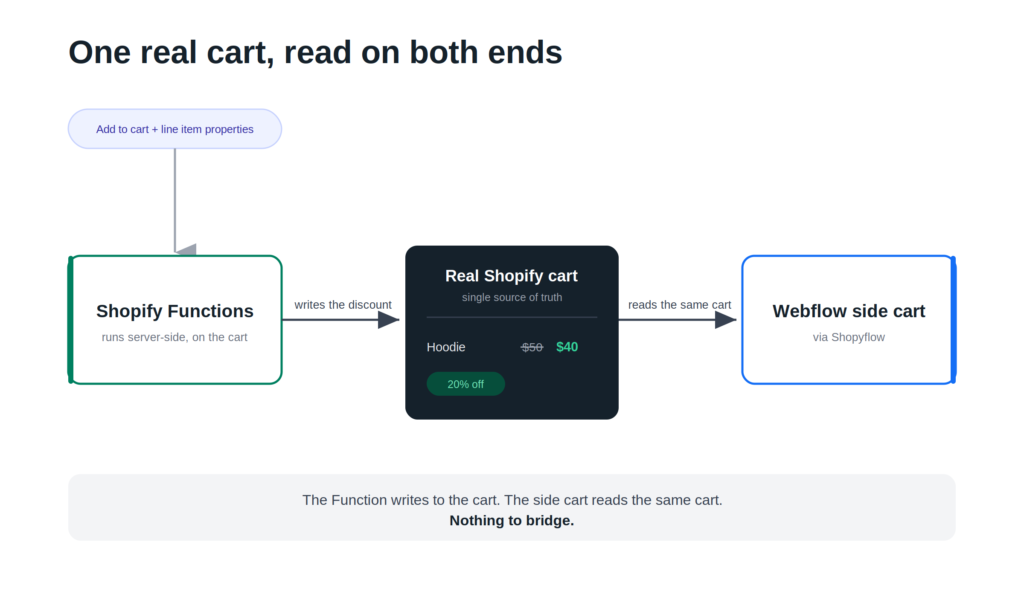
The other half: one real cart, read on both ends
Knowing the Function applies the discount server-side is only half of why this works. The other half is what Shopyflow is actually doing.
Shopyflow doesn’t fake a cart. It doesn’t keep its own private copy of your cart state and try to keep it in sync. It reads the real Shopify cart and renders that. Whatever Shopify has applied to the cart – including discount allocations from a Function – is already sitting on the object Shopyflow is displaying.
This is the key insight, and it’s worth being precise about, because it’s where the “limitation” dies:
- The Function writes the discount onto the real Shopify cart.
- The Webflow side cart reads that same real cart.
- So whatever Shopify applies is exactly what the frontend shows.
There’s nothing to “bridge.” No syncing, no re-creating the discount in the frontend, no clever workaround to get the number to match. Both ends are talking to a single source of truth. The side cart isn’t computing a discount – it’s reflecting one that genuinely exists on the cart.
That’s why this feels like magic the first time and then feels obvious the second time. There was never a gap to begin with.
How I actually triggered the discount
The mechanism that ties the use case together is line item properties.
The discount app I used can target line items based on their properties – custom attributes attached to a line when it’s added to the cart. So the flow looks like this:
- A customer adds a product from the curated listing page.
- On add-to-cart, I push the relevant line item properties along with the product.
- The discount Function reads those properties as part of evaluating the cart, sees the condition is met, and applies the discount allocation to those lines.
- Because Shopyflow is reading the real cart, that discount allocation comes straight through and the discounted price appears in the side cart instantly.
No code field, no customer action beyond adding the product, no checkout-only surprise. The same behavior you’d get in a native Shopify theme, in Webflow.
The mental model to take away
If you remember one thing, make it this: going headless doesn’t cost you Shopify’s discount logic, as long as both ends share one real cart.
The Function writes to the cart. The frontend reads the cart. Whatever’s applied is what’s displayed.
And the next time you’re evaluating whether an app will survive a headless build, skip the marketing copy and the “is this headless-compatible?” support ticket. Ask the questions that actually predict the answer:
- Does the app apply its effect through Shopify Functions, or does it inject something into the Online Store theme? Functions travel anywhere. Theme code stays in the theme.
- Is the discount automatic, or code-based? Automatic discounts apply on their own; a code still has to be entered somewhere in your flow.
- Does my headless connector read the real cart, including discount allocations? Shopyflow does, which is the whole reason the saving shows up.
Three questions, and you’ll know in about thirty seconds whether something will work – often faster than support can tell you it won’t.
Closing
Headless Shopify on Webflow has a reputation for being where features go to break. A lot of that reputation is really just assumptions that nobody pressure-tested. Functions run server-side. Shopyflow reads the real cart. Put those two facts together and a surprising number of “you can’t do that headless” problems quietly stop being problems.
If you’ve shelved a Webflow + Shopify build – or talked yourself out of an app – because you assumed the discount logic wouldn’t carry over, it’s worth a second look. The limit is usually in the assumption, not the stack.
Building something similar and not sure whether your stack will hold up? We’re happy to talk shop.